This new game from Coast of Kobe makes good use of the "Exodus to Kobe" map generation algorithms.
Read more about it here: https://coastofkobe.wordpress.com/about/
Tuesday, August 1, 2017

Wednesday, May 10, 2017
Kansai Rail Simulator - Download Link
Kansai Rail Simulator is now available for download: https://sourceforge.net/projects/kansai-rail-simulator/files/
Please post questions to the Disqus forum below.
Please post questions to the Disqus forum below.
Saturday, March 25, 2017
Kansai Rail Simulator - LP - Russia
Let's Play (Russia)
In this game, I started by building a single surface rail line along the coast, and I chose a "sparse" strategy, building track-only (no stations) on less populated tiles. By turn 58, this line was net profitable:

Next, I moved to the south, where cities were beginning to grow on the forest's edge. By turn 65, I had a small surface rail line there (4 stations):

By turn 70, most of the population was concentrated in 11 major cities (black border in screenshot below). For the two big cities on the west coast, I chose the names Vancouver and Seattle:

At this time (turn 70), Seattle was a more desirable location than Vancouver:

That's because only Seattle was connected to my new subway system in the south:

The "Arctic Line" and "Moscow Metro Line" are highlighted below (Arctic Line in grey, Moscow Metro in red):

I planned to extend the Moscow Metro along the coast to connect with the big cities in the north, but at that time (turn 70), acquiring land in Vancouver was expensive, due to a shortage of available available land, due in turn to Vancouver's relatively high population (1.338 million):

I decided to wait a couple turns before extending the Moscow Metro northwards into Seattle. This gave people time to migrate to the more desirable location (from Vancouver to Seattle). By turn 72, drawn by Seattle's superior connectivity in the rail network, over 300,000 people had migrated from Vancouver. This made land acquisition in Vancouver much cheaper.
By turn 73, I had four cities over population one million (black border):

On turns 79-81 I used the trade winds to rapidly explore the sea in the far south and south-east.
By turn 102, I had 9 big million-plus cities:

Land value in these cities was bolstered by two metro lines. A second line was required in the north-western forest due to geometric constraints (branching is not allowed):

On turn 168, I stopped building, and just started saving money to get the 6th and final tech.
Game finished on turn 173. At this time, I had 6 cities over 2.5 million:

In this game, I started by building a single surface rail line along the coast, and I chose a "sparse" strategy, building track-only (no stations) on less populated tiles. By turn 58, this line was net profitable:

Next, I moved to the south, where cities were beginning to grow on the forest's edge. By turn 65, I had a small surface rail line there (4 stations):

By turn 70, most of the population was concentrated in 11 major cities (black border in screenshot below). For the two big cities on the west coast, I chose the names Vancouver and Seattle:

At this time (turn 70), Seattle was a more desirable location than Vancouver:

That's because only Seattle was connected to my new subway system in the south:

The "Arctic Line" and "Moscow Metro Line" are highlighted below (Arctic Line in grey, Moscow Metro in red):

I planned to extend the Moscow Metro along the coast to connect with the big cities in the north, but at that time (turn 70), acquiring land in Vancouver was expensive, due to a shortage of available available land, due in turn to Vancouver's relatively high population (1.338 million):

I decided to wait a couple turns before extending the Moscow Metro northwards into Seattle. This gave people time to migrate to the more desirable location (from Vancouver to Seattle). By turn 72, drawn by Seattle's superior connectivity in the rail network, over 300,000 people had migrated from Vancouver. This made land acquisition in Vancouver much cheaper.
By turn 73, I had four cities over population one million (black border):

On turns 79-81 I used the trade winds to rapidly explore the sea in the far south and south-east.
By turn 102, I had 9 big million-plus cities:

Land value in these cities was bolstered by two metro lines. A second line was required in the north-western forest due to geometric constraints (branching is not allowed):

On turn 168, I stopped building, and just started saving money to get the 6th and final tech.
Game finished on turn 173. At this time, I had 6 cities over 2.5 million:

Thursday, March 2, 2017
Kansai Rail Simulator - LP
"Kansai Rail Simulator" is coming.
Play as GERMANY:


Play as KOREA:


On January 25, we began work on a powerful rail-network simulation game. It has now reached an advanced stage, and is undergoing testing.
I am inviting current beta testers to post their Let's Plays in the comments section below. Please take a look at these exciting game records!
Play as GERMANY:


Play as KOREA:


On January 25, we began work on a powerful rail-network simulation game. It has now reached an advanced stage, and is undergoing testing.
I am inviting current beta testers to post their Let's Plays in the comments section below. Please take a look at these exciting game records!
Copyright 2017 Matthew J Curran.
Friday, December 23, 2016
Encyclopedia of Drunken Walks
"God does not play dice" vs "God does not waste computational resources"
Drunken walks are ideal for map generation for 3 reasons:
- The generated map is inherently fractal.
- The generated map is definitively random.
- The map can be generated dynamically (on the fly). This dynamic map generation allows for unlimited map size (boundless and infinite).
Drunken walks can be biased to favor any combination of the 6 cardinal/absolute directions (NW, NE, East, SE, SW, West) and the 6 relative directions (straight forward = 12:00, right forward = 2:00, right backward = 4:00, straight backward = 6:00, left backward = 8:00, left forward = 10:00).
These biases can be encoded in 6 weights for cardinal/absolute directions, and 6 weights for relative directions (relative to the current direction of movement).
A drunken walk pattern can thus be defined by 12 weights, and we call this collection of weights the "Direction Tensor". The word "tensor" is used here to mean roughly "an object whose shadow is a vector". At any given point in time, the likelihood of moving in each direction is proportional to the product of the cardinal/absolute weight, and the corresponding relative weight (each relative direction corresponds to an absolute direction, with respect to the current direction of movement).
The effects of chaging the 6 cardinal/absolute weights are fairly predictable, so this study examines only the effects of relative weightings (the 6 cardinal/absolute weights are taken to be equal to each other, so there are no cardinal biases).
- Example Patterns -
Limiting movement to backwards right and left (4:00 and 8:00) leads to a relatively compact but elongated form:
 |
| 50% right backwards (4:00), 50% left backwards (8:00). |
 |
| 66% right backwards (4:00), 33% left backwards (8:00). |
 |
| 66% straight forward (12:00), 33% right forward (2:00). |
 |
| 50% right forward (2:00), 50% left forward (10:00). [example 1/2] |
 |
| 50% right forward (2:00), 50% left forward (10:00). [example 2/2] |
 |
| 20% straight forward (12:00), 20% right forward (2:00), 20% right backward (4:00), 20% left backward (8:00), 20% left forward (10:00). [example 1/3] |
 |
| 20% straight forward (12:00), 20% right forward (2:00), 20% right backward (4:00), 20% left backward (8:00), 20% left forward (10:00). [example 2/3] |
 |
| 20% straight forward (12:00), 20% right forward (2:00), 20% right backward (4:00), 20% left backward (8:00), 20% left forward (10:00). [example 3/3] |
- VBA Code (Class Module) -
'6 weights for the 6 absolute directions:
Public NW As Single
Public NE As Single
Public East As Single
Public SE As Single
Public SW As Single
Public West As Single
'6 weights for the 6 relative directions:
Public StraightForward As Single
Public RightForward As Single
Public RightBackward As Single
Public StraightBackward As Single
Public LeftBackward As Single
Public LeftForward As Single
'6 numbers for current fractional likelihood of each absolute direction:
Public ProbabilityNW As Single
Public ProbabilityNE As Single
Public ProbabilityEast As Single
Public ProbabilitySE As Single
Public ProbabilitySW As Single
Public ProbabilityWest As Single
Public Function GetDirection(ByVal Previous As Location, ByVal Current As Location)
Dim Direction As String
Dim SouthShift, EastShift As Integer
SouthShift = Current.Row - Previous.Row
EastShift = Current.Col - Previous.Col
Direction = "resting"
If SouthShift = 0 And EastShift = 1 Then Direction = "East"
If SouthShift = 0 And EastShift = -1 Then Direction = "West"
If SouthShift = 1 And EastShift = 0 Then Direction = "SE"
If SouthShift = 1 And EastShift = -1 Then Direction = "SW"
If SouthShift = -1 And EastShift = 1 Then Direction = "NE"
If SouthShift = -1 And EastShift = 0 Then Direction = "NW"
GetDirection = Direction
End Function
Public Sub CalculateProbabilities(ByVal Direction As String)
'The public variable "Direction" should be set before calling this sub.
Dim AbsoluteWeights(6) As Single
Dim RelativeWeights(6) As Single
Dim CombinedWeights(6) As Single
Dim Counter, RotatingCounter As Integer
Dim TotalWeights As Single
AbsoluteWeights(0) = Me.NW
AbsoluteWeights(1) = Me.NE
AbsoluteWeights(2) = Me.East
AbsoluteWeights(3) = Me.SE
AbsoluteWeights(4) = Me.SW
AbsoluteWeights(5) = Me.West
RelativeWeights(0) = Me.StraightForward
RelativeWeights(1) = Me.RightForward
RelativeWeights(2) = Me.RightBackward
RelativeWeights(3) = Me.StraightBackward
RelativeWeights(4) = Me.LeftBackward
RelativeWeights(5) = Me.LeftForward
TotalWeights = 0
'Rotate RelativeWeights depending on Direction:
Select Case Direction
Case "NW"
For Counter = 0 To 5
CombinedWeights(Counter) = AbsoluteWeights(Counter) * RelativeWeights(Counter)
TotalWeights = TotalWeights + CombinedWeights(Counter)
Next Counter
Case "NE"
For Counter = 0 To 5
RotatingCounter = (Counter - 1) Mod 6
'We need the next line, because vba does "mod" wrong.
If RotatingCounter < 0 Then RotatingCounter = RotatingCounter + 6
CombinedWeights(Counter) = AbsoluteWeights(Counter) * RelativeWeights(RotatingCounter)
TotalWeights = TotalWeights + CombinedWeights(Counter)
Next Counter
Case "East"
For Counter = 0 To 5
RotatingCounter = (Counter - 2) Mod 6
If RotatingCounter < 0 Then RotatingCounter = RotatingCounter + 6
CombinedWeights(Counter) = AbsoluteWeights(Counter) * RelativeWeights(RotatingCounter)
TotalWeights = TotalWeights + CombinedWeights(Counter)
Next Counter
Case "SE"
For Counter = 0 To 5
RotatingCounter = (Counter - 3) Mod 6
If RotatingCounter < 0 Then RotatingCounter = RotatingCounter + 6
CombinedWeights(Counter) = AbsoluteWeights(Counter) * RelativeWeights(RotatingCounter)
TotalWeights = TotalWeights + CombinedWeights(Counter)
Next Counter
Case "SW"
For Counter = 0 To 5
RotatingCounter = (Counter - 4) Mod 6
If RotatingCounter < 0 Then RotatingCounter = RotatingCounter + 6
CombinedWeights(Counter) = AbsoluteWeights(Counter) * RelativeWeights(RotatingCounter)
TotalWeights = TotalWeights + CombinedWeights(Counter)
Next Counter
Case "West"
For Counter = 0 To 5
RotatingCounter = (Counter - 5) Mod 6
If RotatingCounter < 0 Then RotatingCounter = RotatingCounter + 6
CombinedWeights(Counter) = AbsoluteWeights(Counter) * RelativeWeights(RotatingCounter)
TotalWeights = TotalWeights + CombinedWeights(Counter)
Next Counter
Case "resting"
'If the animal rested on the last turn, absolute/cardinal movement bias controls:
For Counter = 0 To 5
CombinedWeights(Counter) = AbsoluteWeights(Counter)
TotalWeights = TotalWeights + CombinedWeights(Counter)
Next Counter
End Select
'Normalize the probabilities so they add up to 1:
If TotalWeights <> 0 Then
For Counter = 0 To 5
CombinedWeights(Counter) = CombinedWeights(Counter) / TotalWeights
Next Counter
End If
Me.ProbabilityNW = CombinedWeights(0)
Me.ProbabilityNE = CombinedWeights(1)
Me.ProbabilityEast = CombinedWeights(2)
Me.ProbabilitySE = CombinedWeights(3)
Me.ProbabilitySW = CombinedWeights(4)
Me.ProbabilityWest = CombinedWeights(5)
End Sub
Public Sub NormalizeProbabilities(ByVal TotalWeights As Single)
'Use zero to indicate "recalculate TotalWeights":
If TotalWeights = 0 Then
TotalWeights = Me.ProbabilityNW + Me.ProbabilityNE + Me.ProbabilityEast _
+ Me.ProbabilitySE + Me.ProbabilitySW + Me.ProbabilityWest
End If
'If it actually is zero (based on math), then use "absolute values":
If TotalWeights = 0 Then
Me.CalculateProbabilities ("resting")
Else
Me.ProbabilityNW = Me.ProbabilityNW / TotalWeights
Me.ProbabilityNE = Me.ProbabilityNE / TotalWeights
Me.ProbabilityEast = Me.ProbabilityEast / TotalWeights
Me.ProbabilitySE = Me.ProbabilitySE / TotalWeights
Me.ProbabilitySW = Me.ProbabilitySW / TotalWeights
Me.ProbabilityWest = Me.ProbabilityWest / TotalWeights
End If
End Sub
Copyright 2016 Matthew J Curran.

Licensed under the Apache License, Version 2.0 (the "License");
you may not use this code except in compliance with the License.
You may obtain a copy of the License at

    http://www.apache.org/licenses/LICENSE-2.0

Unless required by applicable law or agreed to in writing, software
distributed under the License is distributed on an "AS IS" BASIS,
WITHOUT WARRANTIES OR CONDITIONS OF ANY KIND, either express or implied.
See the License for the specific language governing permissions and
limitations under the License.
Monday, November 28, 2016
Exodus To Kobe 2.0
This version allows domestication of animal herds.
 |
| Click "Update Radar" any time you move over or next to a new herd. |
 |
| Click "Show All my Herds" to view all the animals you have domesticated. |
 |
| Click "Show my Fastest Herds" to view your movement cost over different terrain. |
 |
| You can play as either Germany, Russia, or Korea (single or multi-player). Your goal is still to find Kobe. |
You must enable macros for this game to run in Excel. Never run Excel macros from questionable or unverified websites.
Copyright 2016 Matthew J Curran.  Full license details in Module 1 of the VBA code.

Licensed under the Apache License, Version 2.0 (the "License");
you may not use this file except in compliance with the License.
You may obtain a copy of the License at

    http://www.apache.org/licenses/LICENSE-2.0

Unless required by applicable law or agreed to in writing, software
distributed under the License is distributed on an "AS IS" BASIS,
WITHOUT WARRANTIES OR CONDITIONS OF ANY KIND, either express or implied.
See the License for the specific language governing permissions and
limitations under the License.
Sunday, November 20, 2016
Co-Ex World Explorer - Third Release: Exodus To Kobe
In this mini-game, you can play as either Germany or Korea (single or multi-player). Your goal is to find Kobe.
Most of the key game features (e.g. domestication and evolution of animals) still remain to be implemented. This fully functional mini-game serves primarily to illustrate the power of Dynamic Map Generation (行動的地図開発).
Here are five unique starting maps, all dynamically generated from the same seed map (with the location of Japan semi-randomized):
For single player mode, simply delete the contents of row 7, col 1 in "Maps" tab.
To add a third player, type "Germany", "Korea", or "random" in row 8, col 1 of "Maps" tab, and also make sure to create three additional tabs, which you must "move to end". Type a color index in row 8, col 2. Of course, due to the semi-randomized location of Japan, the third player will be at a disadvantage.
You must enable macros for this game to run in Excel. Never run Excel macros from questionable or unverified websites.
Most of the key game features (e.g. domestication and evolution of animals) still remain to be implemented. This fully functional mini-game serves primarily to illustrate the power of Dynamic Map Generation (行動的地図開発).
Here are five unique starting maps, all dynamically generated from the same seed map (with the location of Japan semi-randomized):
 |
| Germany in NW, Korea in NE, Japan to the south. |
 |
| In this map, the Korean peninsula may turn out to be an island. |
 |
| In this map, a Denmark-like formation separates the North Sea and the Baltic. |
 |
| In this map, Germany and Japan have grown together to form a single continent. |
 |
| The Osaka plain is clearly visible to the east of Kobe (forested tile). |
For single player mode, simply delete the contents of row 7, col 1 in "Maps" tab.
To add a third player, type "Germany", "Korea", or "random" in row 8, col 1 of "Maps" tab, and also make sure to create three additional tabs, which you must "move to end". Type a color index in row 8, col 2. Of course, due to the semi-randomized location of Japan, the third player will be at a disadvantage.

You must enable macros for this game to run in Excel. Never run Excel macros from questionable or unverified websites.
Copyright 2016.  Full license details in Module 1 of the VBA code.

Licensed under the Apache License, Version 2.0 (the "License");
you may not use this file except in compliance with the License.
You may obtain a copy of the License at

    http://www.apache.org/licenses/LICENSE-2.0

Unless required by applicable law or agreed to in writing, software
distributed under the License is distributed on an "AS IS" BASIS,
WITHOUT WARRANTIES OR CONDITIONS OF ANY KIND, either express or implied.
See the License for the specific language governing permissions and
limitations under the License.
Tuesday, November 15, 2016


Monday, November 7, 2016
Preview of New Features: Graphics
The next release will feature (optional) fancy graphics:

These can be very easily customized simply by editing the "Painter" tab:

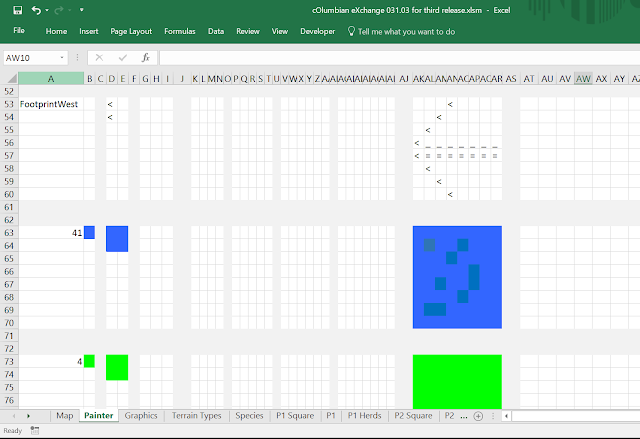

These can be very easily customized simply by editing the "Painter" tab:


Saturday, October 29, 2016
Columbian Exchange World Explorer: Second Release
This second release features some major new features:
Use the buttons on the "Map" tab to start a new game, resume a game in progress, or simply watch the animals migrate.
You must enable macros for this game to run in Excel. Never run Excel macros from questionable or unverified websites.
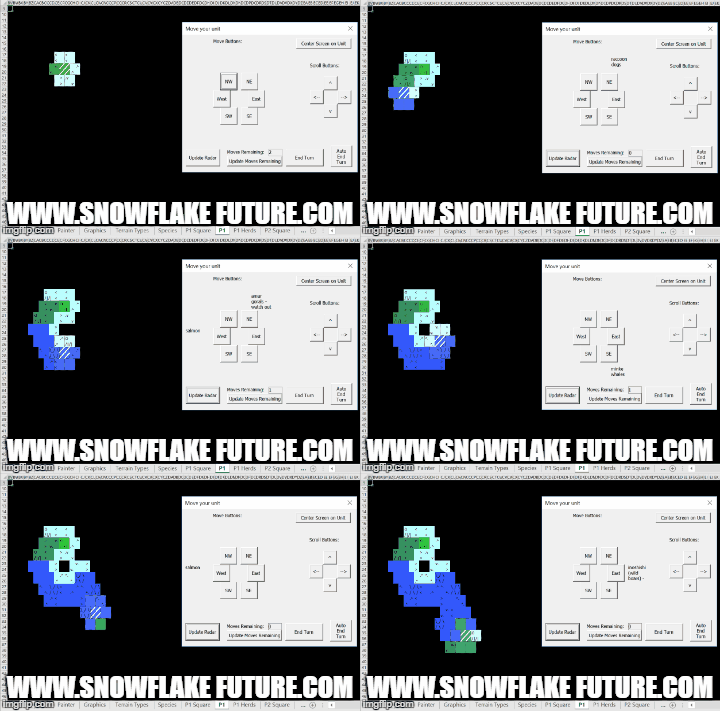
- Advanced Map Generation. The Map is now created dynamically by a swarm of autonomous map generators (henceforth "animals").
- Animals. For now you can enjoy watching them migrate. In future versions, you can domesticate and evolve them - or hunt them to extinction.
- Terrain. The game now features a variety of terrains: forest will slow you down; snow capped mountains will bring you to a crawl.
 |
| Watching the animals migrate. |
 |
| A game in progress. |

 |
| Example game (single player). |
Use the buttons on the "Map" tab to start a new game, resume a game in progress, or simply watch the animals migrate.
You must enable macros for this game to run in Excel. Never run Excel macros from questionable or unverified websites.
Copyright 2016.  Full license details in Module 1 of the VBA code.

Licensed under the Apache License, Version 2.0 (the "License");
you may not use this file except in compliance with the License.
You may obtain a copy of the License at

    http://www.apache.org/licenses/LICENSE-2.0

Unless required by applicable law or agreed to in writing, software
distributed under the License is distributed on an "AS IS" BASIS,
WITHOUT WARRANTIES OR CONDITIONS OF ANY KIND, either express or implied.
See the License for the specific language governing permissions and
limitations under the License.
Monday, October 24, 2016
Preview of New Features: Animals
The next release will feature migrating animals! Here is a sneak peek:

The animals are represented by dashed diagonal lines. Here we can see a single herd of sheep, five herds of dolphins, and five herds of forest elephants.

The animals are represented by dashed diagonal lines. Here we can see a single herd of sheep, five herds of dolphins, and five herds of forest elephants.
Wednesday, October 19, 2016
Preview of New Features: Terrain
The next release will feature new terrain types:

- Forest (dark green)
- Desert (orange)
- Mountains (ice blue)

Tuesday, October 18, 2016
Co-Ex World Explorer: First Release - The Map Generator
This first release of the game is just the foundation for the exciting modifications to come. It is basically a map generator, which can be played as a freestanding exploration game.
This code uses on-the-fly map generation (dynamic map generation) to allow unlimited exploration.

The sheets/tabs of your excel file must be named as in the above screenshot. You must also add buttons to call the macros "ResumeGame" and "ShowStartButton". And you must create user forms as shown at the bottom of the code section.
Finally, you should include text on rows 6 and 7 of the sheet/tab labeled "Map" as in the following screenshot:

To play single player mode, go into the sheet/tab labeled "Map" and delete "human" from row 7. To add a third player, create two additional sheets/tabs ("Player3" and "Player3 Hex View"), and add "human" and a color index to row 8.
Here is the Visual Basic code, divided into four modules:
'Module 1
'Model/View
'Initializer functions.
'Copyright 2016 Matthew J Curran
'
'Licensed under the Apache License, Version 2.0 (the "License");
'you may not use this file except in compliance with the License.
'You may obtain a copy of the License at
'
' http://www.apache.org/licenses/LICENSE-2.0
'
'Unless required by applicable law or agreed to in writing, software
'distributed under the License is distributed on an "AS IS" BASIS,
'WITHOUT WARRANTIES OR CONDITIONS OF ANY KIND, either express or implied.
'See the License for the specific language governing permissions and
'limitations under the License.
Option Explicit
Public ANewTileHasBeenExplored As Boolean
'Worksheet Indexes:
Public ActiveSquareIndex As Integer
Public ActiveHexIndex As Integer
'Color indexes (indices):
Public Const Black As Integer = 1
Public Const White As Integer = 2
Public Const Grey As Integer = 48
Public Const Grass As Integer = 4
Public Const Water As Integer = 41
Public Const LibertyColor As Integer = 56 'unexplored and might be land
Public Const NumReservedSheets = 1 ' "Map"
Public Const NumSheetsPerPlayer = 2 ' a square view and a hexagonal view.
Public Const FirstMapRow = 5
Public Const FirstMapCol = 4
'<-- if these are changed, FormatSheet() must also be changed!
Public Const FirstDebugRow = 22
Public Const DebuggingIsOn As Boolean = False
Public DebugRow As Integer
'The term 'liberty' (liberties) is borrowed from weiqi.
'In this game, it represents the number of unexplored tiles adjacent to the continent the active unit is on:
Public Const NumLibertiesRow = 19
Public NumLiberties As Integer
'Variables stored on each player's sheet:
Public Const LandPointsRow = 1
Public Const WaterPointsRow = 2
Public Const MovementsRemainingRow = 3
Public Const MovesPerTurnRow = 4
Public Const ActiveUnitRowStoredAtRow = 12
Public Const ActiveUnitColStoredAtRow = 13
Public Const LastMapRowStoredAtRow = 18
Public Const LastMapColStoredAtRow = 19
'variables stored on worksheet "Map":
Public Const FirstPlayerRow = 6
'Public Const WhoseTurnRow = 21
Public Const TurnRowStoredAtRow = 22
Dim ws As Worksheet
Const InitialMovesPerTurn As Integer = 2
Sub FormatSheet()
ActiveSheet.Cells.ClearFormats
'Fix (make sticky) the top four rows and leftmost three colums:
Range("D5").Select
ActiveWindow.FreezePanes = True
'Make the background grey:
Range("A1:zz999").Interior.ColorIndex = Grey
'Make the infor area in frozen pane white:
Range("a1:b4").Interior.ColorIndex = White
'Make the whole map black:
Range("D5:ZZ999").Interior.ColorIndex = Black
'Adjust column width:
Columns("D:ZZ").ColumnWidth = 1.6
End Sub
Sub InitializeMasterMap()
Application.StatusBar = "Initialize Master Map ()"
Worksheets("Map").Select
Call FormatSheet
'Clear the map (not the data):
Range("D5:ZZ999").Value = ""
Cells(TurnRowStoredAtRow, 1).Value = "Turn Row:"
Cells(TurnRowStoredAtRow, 2).Value = FirstPlayerRow
Cells(LastMapRowStoredAtRow, 1).Value = "farthest south:"
Cells(LastMapColStoredAtRow, 1).Value = "farthest east:"
End Sub
'For each player:
Sub FormatSquareSheet(WorksheetIndex As Integer)
Application.StatusBar = "Format Sheet (WorksheetIndex)"
Worksheets(WorksheetIndex).Select
Call FormatSheet
'Clear all the data:
Range("A1:ZZ999").Value = ""
'Initialize game data:
Cells(LandPointsRow, 1).Value = "Land Points:"
Cells(WaterPointsRow, 1).Value = "Water Points:"
Cells(MovesPerTurnRow, 1).Value = "Moves Per Turn:"
Cells(MovesPerTurnRow, 2).Value = InitialMovesPerTurn
Cells(MovementsRemainingRow, 1).Value = "Moves left:"
Cells(MovementsRemainingRow, 2).Value = InitialMovesPerTurn
Cells(NumLibertiesRow, 1).Value = "#Liberties:" 'possible new land tiles adjacent to continent
Cells(NumLibertiesRow, 2).Value = 0
Cells(LastMapRowStoredAtRow, 1).Value = "farthest south:"
Cells(LastMapColStoredAtRow, 1).Value = "farthest east:"
Cells(ActiveUnitRowStoredAtRow, 1).Value = "active unit row:"
Cells(ActiveUnitColStoredAtRow, 1).Value = "active unit col:"
End Sub
Sub FormatHexSheet(WorksheetIndex As Integer)
Application.StatusBar = "Format Hex Sheet (WorksheetIndex)"
Worksheets(WorksheetIndex).Select
ActiveSheet.Cells.ClearFormats
Call FormatSheet
'Clear all the data:
Range("A1:C999").Value = ""
'Initialize game data:
Cells(LandPointsRow, 1).Value = "Land Points:"
Cells(WaterPointsRow, 1).Value = "Water Points:"
Cells(WaterPointsRow, 2).Value = 0
Cells(MovementsRemainingRow, 1).Value = "Moves left:"
Cells(MovementsRemainingRow, 2).Value = InitialMovesPerTurn
Cells(MovesPerTurnRow, 1).Value = "Moves Per Turn:"
Cells(MovesPerTurnRow, 2).Value = InitialMovesPerTurn
Cells(NumLibertiesRow, 1).Value = "#Liberties:"
End Sub
Sub GenerateInitialMap(WorksheetIndex As Integer, Row As Integer, Col As Integer)
Application.StatusBar = "Generate Initial Map (WorksheetIndex, Row, Col)"
ActiveSquareIndex = WorksheetIndex
ActiveHexIndex = ActiveSquareIndex + 1
'Make the starting tile green:
Worksheets(WorksheetIndex).Select
Cells(Row, Col).Interior.ColorIndex = Grass
'Copy it to the Master Map:
Worksheets("Map").Select
Cells(Row, Col).Interior.ColorIndex = Grass
Worksheets(WorksheetIndex).Select
Call GenerateNewTiles(Row, Col)
'Get the color index for this player:
Dim UnitColor, WhoseTurn As Integer
WhoseTurn = ((WorksheetIndex - NumReservedSheets) + 1) / 2
UnitColor = Sheets("Map").Cells(FirstPlayerRow + WhoseTurn - 1, 2)
Worksheets(ActiveSquareIndex).Select
'Mark the starting location of the active unit:
With Cells(Row, Col).Borders(xlDiagonalUp)
.LineStyle = xlContinuous
.ColorIndex = UnitColor
.Weight = xlThick
End With
'Mark it on the Master Map as well:
Worksheets("Map").Select
With Cells(Row, Col).Borders(xlDiagonalUp)
.LineStyle = xlContinuous
.ColorIndex = UnitColor
.Weight = xlThick
End With
Worksheets(ActiveSquareIndex).Select
Cells(ActiveUnitRowStoredAtRow, 2).Value = Row
Cells(ActiveUnitColStoredAtRow, 2).Value = Col
'Record the south-most and east-most explored tiles:
Cells(LastMapRowStoredAtRow, 2).Value = Row + 1
Cells(LastMapColStoredAtRow, 2).Value = Col + 1
Call CountLiberties(Row, Col)
End Sub
Sub GenerateMapsForAllPlayers()
Application.StatusBar = "Generate Maps For All Players ()"
DebugRow = FirstDebugRow
Application.ScreenUpdating = False
Dim CurrentPlayerRow As Integer
CurrentPlayerRow = FirstPlayerRow
Dim WorksheetIndex As Integer
WorksheetIndex = NumReservedSheets + 1
Call InitializeMasterMap
Do
Call FormatSquareSheet(WorksheetIndex) 'format the square sheet.
Call FormatHexSheet(WorksheetIndex + 1) 'format the hex sheet.
Call GenerateInitialMap(WorksheetIndex, FirstMapRow + 5, FirstMapCol + WorksheetIndex * NumSheetsPerPlayer)
Call ConvertToHexView(WorksheetIndex, WorksheetIndex + 1)
CurrentPlayerRow = CurrentPlayerRow + 1
WorksheetIndex = WorksheetIndex + NumSheetsPerPlayer 'skip over the hex sheets.
Loop While Sheets("Map").Cells(CurrentPlayerRow, 1).Value <> ""
Application.ScreenUpdating = True
Application.StatusBar = False 'returns control of the statusbar to Excel.
End Sub
'-------------------------------------------------------------------------------------------------------------------------
'Module 2
'Model/View
'Recurring functions.
'Copyright 2016 Matthew J Curran
'
'Licensed under the Apache License, Version 2.0 (the "License");
'you may not use this file except in compliance with the License.
'You may obtain a copy of the License at
'
' http://www.apache.org/licenses/LICENSE-2.0
'
'Unless required by applicable law or agreed to in writing, software
'distributed under the License is distributed on an "AS IS" BASIS,
'WITHOUT WARRANTIES OR CONDITIONS OF ANY KIND, either express or implied.
'See the License for the specific language governing permissions and
'limitations under the License.
Option Explicit
Sub OneByOneToTwoByTwo(OriginSheet As Integer, TargetSheet As Integer, ByVal Row As Integer, ByVal Col As Integer, ByVal ULRow As Integer, ByVal ULCol As Integer)
'(Row,Col) is the 1x1 range in the origin sheet. (ULRow,ULCol) is the Upper Left cell in the 2x2 range in the target sheet.
Application.StatusBar = "One By One To Two By Two (OriginSheet, TargetSheet, Row, Col, ULRow, ULCol)"
Dim Color As Integer
Dim OriginRng, TargetRng As Range
Dim Cell As Object
Color = Worksheets(OriginSheet).Cells(Row, Col).Interior.ColorIndex
With Worksheets(OriginSheet)
Set OriginRng = .Range(.Cells(Row, Col).Address)
End With
With Worksheets(TargetSheet)
Set TargetRng = .Range(.Cells(ULRow, ULCol), .Cells(ULRow + 1, ULCol + 1))
End With
'Copy the color of the origin cell to all 4 target cells:
For Each Cell In TargetRng.Cells
Cell.Interior.ColorIndex = Color
Next Cell
'Create a border (if the tile is explored):
If Color <> Black And Color <> Grey Then
TargetRng.BorderAround LineStyle:=xlDot, ColorIndex:=1
End If
'Copy unit markers into all four cells, for better visibility:
Dim HasUnit, HasPlantsOrAnimals As Boolean
HasUnit = False
HasPlantsOrAnimals = False
Dim UnitColor, PlantsOrAnimalsColor As Integer
'DiagonalUp (/) for units:
If Cells(Row, Col).Borders(xlDiagonalUp).LineStyle = xlContinuous Then
HasUnit = True
UnitColor = Cells(Row, Col).Borders(xlDiagonalUp).ColorIndex
End If
'DiagonalDown (\) for plants and animals:
If Cells(Row, Col).Borders(xlDiagonalDown).LineStyle = xlContinuous Then
HasPlantsOrAnimals = True
PlantsOrAnimalsColor = Cells(Row, Col).Borders(xlDiagonalDown).ColorIndex
End If
If HasUnit Then
With TargetRng.Borders(xlDiagonalUp)
.LineStyle = xlContinuous
.ColorIndex = UnitColor
.Weight = xlThick
End With
Else
TargetRng.Borders(xlDiagonalUp).LineStyle = xlNone
End If
If HasPlantsOrAnimals Then
With TargetRng.Borders(xlDiagonalDown)
.LineStyle = xlContinuous
.ColorIndex = PlantsOrAnimalsColor
.Weight = xlThick
End With
Else
TargetRng.Borders(xlDiagonalDown).LineStyle = xlNone
End If
'Copy all the contents/formats of the origin cell into the Upper Left corner cell alone:
With Worksheets(TargetSheet)
Set TargetRng = .Range(.Cells(ULRow, ULCol).Address)
End With
OriginRng.Copy TargetRng
Application.StatusBar = False
End Sub
Sub UpdateHexView(CenterRow, CenterCol)
'Update only the closest 9 tiles.
Application.StatusBar = "Update Hex View (CenterRow, CenterCol)"
Dim Row, Col, Offset, ULRow, ULCol As Integer
For Row = CenterRow - 1 To CenterRow + 1
ULRow = (2 * Row) - 1
Offset = Row - FirstMapRow
For Col = CenterCol - 1 To CenterCol + 1
ULCol = Offset + (2 * Col) - 1
Call OneByOneToTwoByTwo(ActiveSquareIndex, ActiveHexIndex, Row, Col, ULRow, ULCol)
Next Col
Next Row
End Sub
Sub ConvertToHexView(OriginSheet As Integer, TargetSheet As Integer)
Application.StatusBar = "Convert To Hex View (OriginSheet, TargetSheet)"
ActiveSquareIndex = OriginSheet
Dim LastMapRow, LastMapCol As Integer
Dim Row, Col, Offset, ULRow, ULCol As Integer
'(ULRow,ULCol) is the Upper Left cell of a 2x2 range on target sheet.
'Read in values from player's sheet:
Worksheets(OriginSheet).Select
LastMapRow = Cells(LastMapRowStoredAtRow, 2)
LastMapCol = Cells(LastMapColStoredAtRow, 2)
For Row = FirstMapRow - 1 To LastMapRow + 1 '(a border of unexplored tiles)
ULRow = (2 * Row) - 1
Offset = Row - FirstMapRow
For Col = FirstMapCol - 1 To LastMapCol + 1
ULCol = Offset + (2 * Col) - 1
Call OneByOneToTwoByTwo(OriginSheet, TargetSheet, Row, Col, ULRow, ULCol)
Next Col
Next Row
Call MakeTheUpperLeftTwoByTwoBlack
End Sub
Sub MakeTheUpperLeftTwoByTwoBlack()
Dim Row, Col, ULRow, ULCol, TileSize As Integer
TileSize = 2
ULRow = FirstMapRow + TileSize
ULCol = FirstMapCol
For Row = ULRow To ULRow - 1 + TileSize
For Col = ULCol To ULCol - 1 + TileSize
Worksheets(ActiveHexIndex).Cells(Row, Col).Interior.ColorIndex = Black
Next Col
Next Row
End Sub
Sub EndTurn()
Application.StatusBar = "End Turn ()"
Application.ScreenUpdating = False
Dim MovesPerTurn As Integer
ActiveSquareIndex = ActiveHexIndex - 1
Worksheets(ActiveSquareIndex).Select 'switch from hex to square sheet.
'Update range of motion based on land points:
MovesPerTurn = Int(Cells(LandPointsRow, 2) / 7) + 1
Cells(MovesPerTurnRow, 2).Value = MovesPerTurn
'restore full movement to all units:
Cells(MovementsRemainingRow, 2).Value = MovesPerTurn
'Perform the previous two updates for hex view:
Worksheets(ActiveHexIndex).Select
Cells(MovesPerTurnRow, 2).Value = MovesPerTurn
Cells(MovementsRemainingRow, 2).Value = MovesPerTurn
Worksheets("Map").Select
Dim OldTurnRow, NewTurnRow, nthPlayer As Integer
OldTurnRow = Cells(TurnRowStoredAtRow, 2).Value
NewTurnRow = OldTurnRow + 1 'the next player is one row below the previous player.
'but if its blank, it means every player has played, and we start over at player 1 (on Sheet2):
If Cells(NewTurnRow, 1) = "" Then
NewTurnRow = FirstPlayerRow
End If
nthPlayer = 1 + NewTurnRow - FirstPlayerRow
Cells(TurnRowStoredAtRow, 2) = NewTurnRow
ActiveSquareIndex = NumReservedSheets + 1 + (nthPlayer - 1) * NumSheetsPerPlayer
ActiveHexIndex = ActiveSquareIndex + 1
'Update 9 tiles of square sheet from MasterMap:
Worksheets(ActiveSquareIndex).Select
Dim ActiveUnitRow, ActiveUnitCol As Integer
ActiveUnitRow = Cells(ActiveUnitRowStoredAtRow, 2)
ActiveUnitCol = Cells(ActiveUnitColStoredAtRow, 2)
Call UpdateFromMasterMap(ActiveUnitRow, ActiveUnitCol)
'Update the corresponding hex view:
Call UpdateHexView(ActiveUnitRow, ActiveUnitCol)
'Update liberties (could be affected by other players's explorations:
Worksheets(ActiveSquareIndex).Select
ActiveUnitRow = Cells(ActiveUnitRowStoredAtRow, 2).Value
ActiveUnitCol = Cells(ActiveUnitColStoredAtRow, 2).Value
Call CountLiberties(ActiveUnitRow, ActiveUnitCol)
'Show the hex view:
Worksheets(ActiveHexIndex).Select
Application.StatusBar = False
Application.ScreenUpdating = True
End Sub
Sub UpdateFromMasterMap(Row, Col)
'Updates a 9 cell zone around the given row,col.
Application.StatusBar = "Update From Master Map (Row, Col)"
Dim CenterOfUpdateRegionX, CenterOfUpdateRegionY As Integer
CenterOfUpdateRegionX = Row
CenterOfUpdateRegionY = Col
Dim X, Y As Integer 'where Cells(x,y) is the Upper Left of the update region.
Dim XLR, YLR As Integer 'where Cells(xlr,ylr) is the Lower Right of the update region.
X = CenterOfUpdateRegionX - 1
Y = CenterOfUpdateRegionY - 1
XLR = CenterOfUpdateRegionX + 1
YLR = CenterOfUpdateRegionY + 1
'Make sure the left and top boundaries of map are not exceeded:
If X < FirstMapRow Then X = FirstMapRow
If Y < FirstMapCol Then Y = FirstMapCol
Dim Rng1 As Range
Dim Rng2 As Range
With Sheets("Map")
Set Rng1 = .Range(.Cells(X, Y), .Cells(XLR, YLR))
End With
With Worksheets(ActiveSquareIndex)
Set Rng2 = .Range(.Cells(X, Y), .Cells(XLR, YLR))
End With
Rng1.Copy Rng2
End Sub
Sub IncrementNumLiberties()
Application.StatusBar = "Increment Num Liberties ()"
NumLiberties = Worksheets(ActiveSquareIndex).Cells(NumLibertiesRow, 2).Value + 1
Worksheets(ActiveSquareIndex).Cells(NumLibertiesRow, 2).Value = NumLiberties
Worksheets(ActiveHexIndex).Cells(NumLibertiesRow, 2).Value = NumLiberties
End Sub
Sub DecrementNumLiberties()
Application.StatusBar = "Decrement Num Liberties ()"
NumLiberties = Worksheets(ActiveSquareIndex).Cells(NumLibertiesRow, 2).Value - 1
Worksheets(ActiveSquareIndex).Cells(NumLibertiesRow, 2).Value = NumLiberties
Worksheets(ActiveHexIndex).Cells(NumLibertiesRow, 2).Value = NumLiberties
End Sub
Sub DecrementMovementsRemaining()
Application.StatusBar = "Decrement Movements Remaining ()"
Dim MovementsRemaining As Integer
MovementsRemaining = Worksheets(ActiveSquareIndex).Cells(MovementsRemainingRow, 2).Value - 1
'Update both square and hex sheets:
Worksheets(ActiveSquareIndex).Cells(MovementsRemainingRow, 2).Value = MovementsRemaining
Worksheets(ActiveHexIndex).Cells(MovementsRemainingRow, 2).Value = MovementsRemaining
End Sub
Sub GenerateNewTiles(Row, Col)
'Call this whenever a unit is moved.
'(Row,Col) is the new (current) location of the unit.
'It will check for unexplored (black) tiles adjacent to the unit, and generate new map tile at each one.
Application.StatusBar = "Generate New Tiles (Row, Col)"
'Call GenerateOneNewTile() 9 times:
Dim X, Y As Integer
For X = -1 To 1
For Y = -1 To 1
'Only generate a new tile if we arent standing on it:
If X <> 0 Or Y <> 0 Then
'This if statement allows diagonal tiles to be treated differently:
If X * Y = 0 Then
Call GenerateOneNewTile(Row + X, Col + Y, 40)
Else
Call GenerateOneNewTile(Row + X, Col + Y, 40)
End If
End If
Next Y
Next X
End Sub
Sub GenerateOneNewTile(Row, Col, PercentChanceOfLand)
Application.StatusBar = "Generate One New Tile (Row, Col, PercentChanceOfLand)"
Dim ExistingColor As Integer
Dim RandomNumber As Single
Dim NewColor As Integer
If (Row < 5) Or (Col < 4) Then Exit Sub 'because the top and left are reserved, and not part of map.
ExistingColor = Worksheets("Map").Cells(Row, Col).Interior.ColorIndex
If ExistingColor = Black Then ANewTileHasBeenExplored = True
If ExistingColor = LibertyColor Then Call DecrementNumLiberties 'it used to be a liberty.
If (ExistingColor <> Black) And (ExistingColor <> LibertyColor) Then
Worksheets("Map").Range(Cells(Row, Col).Address).Copy Worksheets(ActiveSquareIndex).Range(Cells(Row, Col).Address)
Exit Sub 'done, because its already generated and on master map.
End If
RandomNumber = Rnd()
NumLiberties = Cells(NumLibertiesRow, 2).Value
If NumLiberties < 2 Then
NewColor = Grass 'if there is only one possible tile, make sure it is land!
Call IncrementLandPoints
Else
If RandomNumber < (PercentChanceOfLand / 100) Then
NewColor = Grass
Call IncrementLandPoints
Else
NewColor = Water
Call IncrementWaterPoints
End If
End If
Cells(Row, Col).Interior.ColorIndex = NewColor
'Copy the new tile to the Master Map:
Worksheets("Map").Select
Cells(Row, Col).Interior.ColorIndex = NewColor
Worksheets(ActiveSquareIndex).Select
End Sub
Sub IncrementLandPoints()
Application.StatusBar = "Increment Land Points ()"
Dim LandPoints As Integer
LandPoints = Cells(LandPointsRow, 2).Value
LandPoints = LandPoints + 1
Cells(LandPointsRow, 2).Value = LandPoints
Worksheets(ActiveHexIndex).Cells(LandPointsRow, 2).Value = LandPoints
End Sub
Sub IncrementWaterPoints()
Application.StatusBar = "Increment Water Points ()"
Dim WaterPoints As Integer
WaterPoints = Cells(WaterPointsRow, 2).Value
WaterPoints = WaterPoints + 1
Cells(WaterPointsRow, 2).Value = WaterPoints
Worksheets(ActiveHexIndex).Cells(WaterPointsRow, 2).Value = WaterPoints
End Sub
Sub ResumeGame()
'Determine whose turn it is, activate their hexView sheet, and show joystick.
Application.StatusBar = "Resume Game ()"
Dim TurnRow, nthPlayersTurn, TheirSheetIndex As Integer
TurnRow = Worksheets("Map").Cells(TurnRowStoredAtRow, 2).Value
nthPlayersTurn = Worksheets("Map").Cells(TurnRow, 2).Value
TheirSheetIndex = NumReservedSheets + 2 + (nthPlayersTurn - 1) * NumSheetsPerPlayer '2 because the hexView is the second sheet.
Worksheets(TheirSheetIndex).Activate
Call ShowJoystick
End Sub
'-------------------------------------------------------------------------------------------------------------------------
'Module 3
'Controller
'Copyright 2016 Matthew J Curran
'
'Licensed under the Apache License, Version 2.0 (the "License");
'you may not use this file except in compliance with the License.
'You may obtain a copy of the License at
'
' http://www.apache.org/licenses/LICENSE-2.0
'
'Unless required by applicable law or agreed to in writing, software
'distributed under the License is distributed on an "AS IS" BASIS,
'WITHOUT WARRANTIES OR CONDITIONS OF ANY KIND, either express or implied.
'See the License for the specific language governing permissions and
'limitations under the License.
Option Explicit
Dim ActiveUnitRow, ActiveUnitCol As Integer
Dim NewRow, NewCol As Integer 'new location of the active unit.
Sub MoveThisFarSouthAndThisFarEast(Southwards As Integer, Eastwards As Integer)
'Moves the active unit to the specified cell (if allowed).
'It is allowed if that tile is land.
Application.StatusBar = "Move This Far South And This Far East (Southwards, Eastwards)"
Application.ScreenUpdating = False
ANewTileHasBeenExplored = False
ActiveHexIndex = ActiveSheet.Index
ActiveSquareIndex = ActiveHexIndex - 1
Worksheets(ActiveSquareIndex).Select
'Exit sub if there are no movements remaining:
If Cells(MovementsRemainingRow, 2).Value < 1 Then
Worksheets(ActiveHexIndex).Select
MsgBox ("out of moves")
Exit Sub
End If
ActiveUnitRow = Cells(ActiveUnitRowStoredAtRow, 2).Value
ActiveUnitCol = Cells(ActiveUnitColStoredAtRow, 2).Value
NewRow = ActiveUnitRow + Southwards
NewCol = ActiveUnitCol + Eastwards
'Check if the new location is legal:
'Is it land?:
If Cells(NewRow, NewCol).Interior.ColorIndex <> Grass Then
MsgBox ("illegal move")
Worksheets(ActiveHexIndex).Select
Exit Sub
End If
'Is it occupied by another unit?:
If Cells(NewRow, NewCol).Borders(xlDiagonalUp).LineStyle = xlContinuous Then
MsgBox ("illegal move")
Worksheets(ActiveHexIndex).Select
Exit Sub
End If
'Get the color index for this player:
Dim WhoseTurn, UnitColor As Integer
WhoseTurn = Sheets("Map").Cells(TurnRowStoredAtRow, 2)
UnitColor = Sheets("Map").Cells(WhoseTurn, 2)
Worksheets(ActiveSquareIndex).Select
'Update the record of the new location:
Cells(ActiveUnitRowStoredAtRow, 2).Value = NewRow
Cells(ActiveUnitColStoredAtRow, 2).Value = NewCol
'Mark the new location:
With Cells(NewRow, NewCol).Borders(xlDiagonalUp)
.LineStyle = xlContinuous
.ColorIndex = UnitColor
.Weight = xlThick
End With
'Unmark the old location:
Cells(ActiveUnitRow, ActiveUnitCol).Borders(xlDiagonalUp).LineStyle = xlNone
'Mark the new and unmark the old on the Master Map:
Worksheets("Map").Select
With Cells(NewRow, NewCol).Borders(xlDiagonalUp)
.LineStyle = xlContinuous
.ColorIndex = UnitColor
.Weight = xlThick
End With
Cells(ActiveUnitRow, ActiveUnitCol).Borders(xlDiagonalUp).LineStyle = xlNone
Worksheets(ActiveSquareIndex).Select
'Call an AI function to generate new map tiles:
Call GenerateNewTiles(NewRow, NewCol)
'Recount the number of liberties (land adjacent unexplored tiles) if a new tile has been explored:
'Cells(NumLibertiesRow, 2).Value = 0
If ANewTileHasBeenExplored Then
Call CountLiberties(ActiveUnitRow, ActiveUnitCol)
Worksheets(ActiveSquareIndex).Select
End If
'Update the limits of explored map:
Dim LRRow, LRCol As Integer 'Lower Right.
LRRow = NewRow + 1
LRCol = NewCol + 1
Dim LastMapRow, LastMapCol, LastMasterMapRow, LastMasterMapCol As Integer
LastMapRow = Cells(LastMapRowStoredAtRow, 2).Value
LastMapCol = Cells(LastMapColStoredAtRow, 2).Value
If LRRow > LastMapRow Then Cells(LastMapRowStoredAtRow, 2).Value = LRRow
If LRCol > LastMapCol Then Cells(LastMapColStoredAtRow, 2).Value = LRCol
With Worksheets("Map")
LastMasterMapRow = .Cells(LastMapRowStoredAtRow, 2).Value
LastMasterMapCol = .Cells(LastMapColStoredAtRow, 2).Value
If LRRow > LastMasterMapRow Then .Cells(LastMapRowStoredAtRow, 2).Value = LRRow
If LRCol > LastMasterMapCol Then .Cells(LastMapColStoredAtRow, 2).Value = LRCol
End With
'Copy to hex map:
Call UpdateHexView(NewRow, NewCol)
Call DecrementMovementsRemaining
'Reactivate the hex sheet:
Worksheets(ActiveHexIndex).Select
Application.ScreenUpdating = True
End Sub
Sub MoveNorth()
Call MoveThisFarSouthAndThisFarEast(-1, 0)
End Sub
Sub MoveSouth()
Call MoveThisFarSouthAndThisFarEast(1, 0)
End Sub
Sub MoveWest()
Call MoveThisFarSouthAndThisFarEast(0, -1)
End Sub
Sub MoveEast()
Call MoveThisFarSouthAndThisFarEast(0, 1)
End Sub
Sub MoveNE()
Call MoveThisFarSouthAndThisFarEast(-1, 1)
End Sub
Sub MoveSW()
Call MoveThisFarSouthAndThisFarEast(1, -1)
End Sub
Sub ShowJoystick()
Application.StatusBar = "Show Joystick ()"
Joystick.Show
End Sub
Sub ShowStartButton()
StartGameForm.Show
End Sub
'-------------------------------------------------------------------------------------------------------------------------
'Module 4
'Model/View
'Lighthouse Search (AI to count the number of potential new land tiles)
'The lighthouse moves clockwise around coast, staying on land.
'(moves clockwise => it always tries to turn left, relative to its direction of movement).
'Copyright 2016 Matthew J Curran
'
'Licensed under the Apache License, Version 2.0 (the "License");
'you may not use this file except in compliance with the License.
'You may obtain a copy of the License at
'
' http://www.apache.org/licenses/LICENSE-2.0
'
'Unless required by applicable law or agreed to in writing, software
'distributed under the License is distributed on an "AS IS" BASIS,
'WITHOUT WARRANTIES OR CONDITIONS OF ANY KIND, either express or implied.
'See the License for the specific language governing permissions and
'limitations under the License.
Dim Direction As String
Dim LighthouseHasMoved As Boolean
Dim LighthouseRow, LighthouseCol As Integer
Dim PreviousLHRow, PreviousLHCol As Integer 'previous location of the lighthouse.
Sub CheckForLibertyAt(Row, Col)
'(and add it to sum if it is a potential new land tile).
If Cells(Row, Col).Interior.ColorIndex = LibertyColor Then Exit Sub 'already counted.
If Cells(Row, Col).Interior.ColorIndex = Black Then
Call IncrementNumLiberties
Cells(Row, Col).Interior.ColorIndex = LibertyColor 'mark the tile as counted.
End If
End Sub
Sub CheckForLibertyAdjacentTo(Row, Col)
'Application.StatusBar = "Check For Liberty Adjacent To (Row, Col)"
'examine the four squarely adjacent tiles:
Call CheckForLibertyAt(Row - 1, Col)
Call CheckForLibertyAt(Row + 1, Col)
Call CheckForLibertyAt(Row, Col - 1)
Call CheckForLibertyAt(Row, Col + 1)
'examine the 2 hexagonally adjacent tiles (SW and NE):
Call CheckForLibertyAt(Row + 1, Col - 1) 'SW
Call CheckForLibertyAt(Row - 1, Col + 1) 'NE
End Sub
'Six nearly identical subs for six directions:
Sub TryEast()
If LighthouseHasMoved Then Exit Sub
If Cells(LighthouseRow, LighthouseCol + 1).Interior.ColorIndex = Grass Then
'since the tile to the east is known to be land, move the lighthouse there:
Direction = "east"
PreviousLHRow = LighthouseRow
PreviousLHCol = LighthouseCol
LighthouseCol = LighthouseCol + 1
LighthouseHasMoved = True
If DebuggingIsOn Then
Cells(DebugRow, 1).Value = Direction
DebugRow = DebugRow + 1
End If
Call CheckForLibertyAdjacentTo(LighthouseRow, LighthouseCol)
End If
End Sub
Sub TrySE()
If LighthouseHasMoved Then Exit Sub
If Cells(LighthouseRow + 1, LighthouseCol).Interior.ColorIndex = Grass Then
Direction = "SE"
PreviousLHRow = LighthouseRow
PreviousLHCol = LighthouseCol
LighthouseRow = LighthouseRow + 1
LighthouseHasMoved = True
If DebuggingIsOn Then
Cells(DebugRow, 1).Value = Direction
DebugRow = DebugRow + 1
End If
Call CheckForLibertyAdjacentTo(LighthouseRow, LighthouseCol)
End If
End Sub
Sub TrySW()
If LighthouseHasMoved Then Exit Sub
If Cells(LighthouseRow + 1, LighthouseCol - 1).Interior.ColorIndex = Grass Then
Direction = "SW"
PreviousLHRow = LighthouseRow
PreviousLHCol = LighthouseCol
LighthouseRow = LighthouseRow + 1
LighthouseCol = LighthouseCol - 1
LighthouseHasMoved = True
If DebuggingIsOn Then
Cells(DebugRow, 1).Value = Direction
DebugRow = DebugRow + 1
End If
Call CheckForLibertyAdjacentTo(LighthouseRow, LighthouseCol)
End If
End Sub
Sub TryWest()
If LighthouseHasMoved Then Exit Sub
If Cells(LighthouseRow, LighthouseCol - 1).Interior.ColorIndex = Grass Then
Direction = "west"
PreviousLHRow = LighthouseRow
PreviousLHCol = LighthouseCol
LighthouseCol = LighthouseCol - 1
LighthouseHasMoved = True
If DebuggingIsOn Then
Cells(DebugRow, 1).Value = Direction
DebugRow = DebugRow + 1
End If
Call CheckForLibertyAdjacentTo(LighthouseRow, LighthouseCol)
End If
End Sub
Sub TryNW()
If LighthouseHasMoved Then Exit Sub
If Cells(LighthouseRow - 1, LighthouseCol).Interior.ColorIndex = Grass Then
Direction = "NW"
PreviousLHRow = LighthouseRow
PreviousLHCol = LighthouseCol
LighthouseRow = LighthouseRow - 1
LighthouseHasMoved = True
If DebuggingIsOn Then
Cells(DebugRow, 1).Value = Direction
DebugRow = DebugRow + 1
End If
Call CheckForLibertyAdjacentTo(LighthouseRow, LighthouseCol)
End If
End Sub
Sub TryNE()
If LighthouseHasMoved Then Exit Sub
If Cells(LighthouseRow - 1, LighthouseCol + 1).Interior.ColorIndex = Grass Then
Direction = "NE"
PreviousLHRow = LighthouseRow
PreviousLHCol = LighthouseCol
LighthouseRow = LighthouseRow - 1
LighthouseCol = LighthouseCol + 1
LighthouseHasMoved = True
If DebuggingIsOn Then
Cells(DebugRow, 1).Value = Direction
DebugRow = DebugRow + 1
End If
Call CheckForLibertyAdjacentTo(LighthouseRow, LighthouseCol)
End If
End Sub
Sub CountLibertiesInDirection(ByVal Row As Integer, ByVal Col As Integer)
'start lighthouse at (row,col), and stop once it returns to that tile. Moves clockwise.
ActiveSquareIndex = ActiveSheet.Index
Worksheets("Map").Select
LighthouseRow = Row
LighthouseCol = Col
Do
LighthouseHasMoved = False
Select Case Direction
Case "east"
Call TryNW
Call TryNE
Call TryEast 'Only one of these functions will be executed, because each contains an Exit Sub
Call TrySE 'to be executed in case LighthouseHasMoved.
Call TrySW
Call TryWest
Case "SE"
Call TryNE
Call TryEast
Call TrySE
Call TrySW
Call TryWest
Call TryNW
Case "SW"
Call TryEast
Call TrySE
Call TrySW
Call TryWest
Call TryNW
Call TryNE
Case "west"
Call TrySE
Call TrySW
Call TryWest
Call TryNW
Call TryNE
Call TryEast
Case "NW"
Call TrySW
Call TryWest
Call TryNW
Call TryNE
Call TryEast
Call TrySE
Case "NE"
Call TryWest
Call TryNW
Call TryNE
Call TryEast
Call TrySE
Call TrySW
Case Else
MsgBox ("direction error: " & Direction)
End Select
Loop While ((LighthouseRow <> Row) Or (LighthouseCol <> Col))
Worksheets(ActiveSquareIndex).Select
End Sub
Sub CountLiberties(ByVal Row As Integer, ByVal Col As Integer)
Application.StatusBar = "Count Liberties (Row, Col)"
Call ResetAllLibertiesToBlack
'call the helper six times (just in case each direction is an independent peninsula):
Direction = "east"
Call CountLibertiesInDirection(Row, Col)
Direction = "SE"
Call CountLibertiesInDirection(Row, Col)
Direction = "SW"
Call CountLibertiesInDirection(Row, Col)
Direction = "west"
Call CountLibertiesInDirection(Row, Col)
Direction = "NW"
Call CountLibertiesInDirection(Row, Col)
Direction = "NE"
Call CountLibertiesInDirection(Row, Col)
End Sub
Sub ResetAllLibertiesToBlack()
Worksheets(ActiveSquareIndex).Cells(NumLibertiesRow, 2).Value = 0
Worksheets(ActiveHexIndex).Cells(NumLibertiesRow, 2).Value = 0
Dim Row, Col, LastRow, LastCol As Integer
LastRow = Worksheets("Map").Cells(LastMapRowStoredAtRow, 2).Value
LastCol = Worksheets("Map").Cells(LastMapColStoredAtRow, 2).Value
For Row = FirstMapRow To LastRow
For Col = FirstMapCol To LastCol
If Worksheets("Map").Cells(Row, Col).Interior.ColorIndex = LibertyColor Then
Worksheets("Map").Cells(Row, Col).Interior.ColorIndex = Black
End If
Next Col
Next Row
End Sub
'-------------------------------------------------------------------------------------------------------------------------
'-------------------------------------------------------------------------------------------------------------------------
'StartGameButton:
Private Sub StartGameButton_Click()
Call GenerateMapsForAllPlayers
Worksheets(NumReservedSheets + 2).Activate
StartGameForm.Hide
Call ShowJoystick
End Sub
This code uses on-the-fly map generation (dynamic map generation) to allow unlimited exploration.

The sheets/tabs of your excel file must be named as in the above screenshot. You must also add buttons to call the macros "ResumeGame" and "ShowStartButton". And you must create user forms as shown at the bottom of the code section.
Finally, you should include text on rows 6 and 7 of the sheet/tab labeled "Map" as in the following screenshot:

To play single player mode, go into the sheet/tab labeled "Map" and delete "human" from row 7. To add a third player, create two additional sheets/tabs ("Player3" and "Player3 Hex View"), and add "human" and a color index to row 8.
Here is the Visual Basic code, divided into four modules:
'Module 1
'Model/View
'Initializer functions.
'Copyright 2016 Matthew J Curran
'
'Licensed under the Apache License, Version 2.0 (the "License");
'you may not use this file except in compliance with the License.
'You may obtain a copy of the License at
'
' http://www.apache.org/licenses/LICENSE-2.0
'
'Unless required by applicable law or agreed to in writing, software
'distributed under the License is distributed on an "AS IS" BASIS,
'WITHOUT WARRANTIES OR CONDITIONS OF ANY KIND, either express or implied.
'See the License for the specific language governing permissions and
'limitations under the License.
Option Explicit
Public ANewTileHasBeenExplored As Boolean
'Worksheet Indexes:
Public ActiveSquareIndex As Integer
Public ActiveHexIndex As Integer
'Color indexes (indices):
Public Const Black As Integer = 1
Public Const White As Integer = 2
Public Const Grey As Integer = 48
Public Const Grass As Integer = 4
Public Const Water As Integer = 41
Public Const LibertyColor As Integer = 56 'unexplored and might be land
Public Const NumReservedSheets = 1 ' "Map"
Public Const NumSheetsPerPlayer = 2 ' a square view and a hexagonal view.
Public Const FirstMapRow = 5
Public Const FirstMapCol = 4
'<-- if these are changed, FormatSheet() must also be changed!
Public Const FirstDebugRow = 22
Public Const DebuggingIsOn As Boolean = False
Public DebugRow As Integer
'The term 'liberty' (liberties) is borrowed from weiqi.
'In this game, it represents the number of unexplored tiles adjacent to the continent the active unit is on:
Public Const NumLibertiesRow = 19
Public NumLiberties As Integer
'Variables stored on each player's sheet:
Public Const LandPointsRow = 1
Public Const WaterPointsRow = 2
Public Const MovementsRemainingRow = 3
Public Const MovesPerTurnRow = 4
Public Const ActiveUnitRowStoredAtRow = 12
Public Const ActiveUnitColStoredAtRow = 13
Public Const LastMapRowStoredAtRow = 18
Public Const LastMapColStoredAtRow = 19
'variables stored on worksheet "Map":
Public Const FirstPlayerRow = 6
'Public Const WhoseTurnRow = 21
Public Const TurnRowStoredAtRow = 22
Dim ws As Worksheet
Const InitialMovesPerTurn As Integer = 2
Sub FormatSheet()
ActiveSheet.Cells.ClearFormats
'Fix (make sticky) the top four rows and leftmost three colums:
Range("D5").Select
ActiveWindow.FreezePanes = True
'Make the background grey:
Range("A1:zz999").Interior.ColorIndex = Grey
'Make the infor area in frozen pane white:
Range("a1:b4").Interior.ColorIndex = White
'Make the whole map black:
Range("D5:ZZ999").Interior.ColorIndex = Black
'Adjust column width:
Columns("D:ZZ").ColumnWidth = 1.6
End Sub
Sub InitializeMasterMap()
Application.StatusBar = "Initialize Master Map ()"
Worksheets("Map").Select
Call FormatSheet
'Clear the map (not the data):
Range("D5:ZZ999").Value = ""
Cells(TurnRowStoredAtRow, 1).Value = "Turn Row:"
Cells(TurnRowStoredAtRow, 2).Value = FirstPlayerRow
Cells(LastMapRowStoredAtRow, 1).Value = "farthest south:"
Cells(LastMapColStoredAtRow, 1).Value = "farthest east:"
End Sub
'For each player:
Sub FormatSquareSheet(WorksheetIndex As Integer)
Application.StatusBar = "Format Sheet (WorksheetIndex)"
Worksheets(WorksheetIndex).Select
Call FormatSheet
'Clear all the data:
Range("A1:ZZ999").Value = ""
'Initialize game data:
Cells(LandPointsRow, 1).Value = "Land Points:"
Cells(WaterPointsRow, 1).Value = "Water Points:"
Cells(MovesPerTurnRow, 1).Value = "Moves Per Turn:"
Cells(MovesPerTurnRow, 2).Value = InitialMovesPerTurn
Cells(MovementsRemainingRow, 1).Value = "Moves left:"
Cells(MovementsRemainingRow, 2).Value = InitialMovesPerTurn
Cells(NumLibertiesRow, 1).Value = "#Liberties:" 'possible new land tiles adjacent to continent
Cells(NumLibertiesRow, 2).Value = 0
Cells(LastMapRowStoredAtRow, 1).Value = "farthest south:"
Cells(LastMapColStoredAtRow, 1).Value = "farthest east:"
Cells(ActiveUnitRowStoredAtRow, 1).Value = "active unit row:"
Cells(ActiveUnitColStoredAtRow, 1).Value = "active unit col:"
End Sub
Sub FormatHexSheet(WorksheetIndex As Integer)
Application.StatusBar = "Format Hex Sheet (WorksheetIndex)"
Worksheets(WorksheetIndex).Select
ActiveSheet.Cells.ClearFormats
Call FormatSheet
'Clear all the data:
Range("A1:C999").Value = ""
'Initialize game data:
Cells(LandPointsRow, 1).Value = "Land Points:"
Cells(WaterPointsRow, 1).Value = "Water Points:"
Cells(WaterPointsRow, 2).Value = 0
Cells(MovementsRemainingRow, 1).Value = "Moves left:"
Cells(MovementsRemainingRow, 2).Value = InitialMovesPerTurn
Cells(MovesPerTurnRow, 1).Value = "Moves Per Turn:"
Cells(MovesPerTurnRow, 2).Value = InitialMovesPerTurn
Cells(NumLibertiesRow, 1).Value = "#Liberties:"
End Sub
Sub GenerateInitialMap(WorksheetIndex As Integer, Row As Integer, Col As Integer)
Application.StatusBar = "Generate Initial Map (WorksheetIndex, Row, Col)"
ActiveSquareIndex = WorksheetIndex
ActiveHexIndex = ActiveSquareIndex + 1
'Make the starting tile green:
Worksheets(WorksheetIndex).Select
Cells(Row, Col).Interior.ColorIndex = Grass
'Copy it to the Master Map:
Worksheets("Map").Select
Cells(Row, Col).Interior.ColorIndex = Grass
Worksheets(WorksheetIndex).Select
Call GenerateNewTiles(Row, Col)
'Get the color index for this player:
Dim UnitColor, WhoseTurn As Integer
WhoseTurn = ((WorksheetIndex - NumReservedSheets) + 1) / 2
UnitColor = Sheets("Map").Cells(FirstPlayerRow + WhoseTurn - 1, 2)
Worksheets(ActiveSquareIndex).Select
'Mark the starting location of the active unit:
With Cells(Row, Col).Borders(xlDiagonalUp)
.LineStyle = xlContinuous
.ColorIndex = UnitColor
.Weight = xlThick
End With
'Mark it on the Master Map as well:
Worksheets("Map").Select
With Cells(Row, Col).Borders(xlDiagonalUp)
.LineStyle = xlContinuous
.ColorIndex = UnitColor
.Weight = xlThick
End With
Worksheets(ActiveSquareIndex).Select
Cells(ActiveUnitRowStoredAtRow, 2).Value = Row
Cells(ActiveUnitColStoredAtRow, 2).Value = Col
'Record the south-most and east-most explored tiles:
Cells(LastMapRowStoredAtRow, 2).Value = Row + 1
Cells(LastMapColStoredAtRow, 2).Value = Col + 1
Call CountLiberties(Row, Col)
End Sub
Sub GenerateMapsForAllPlayers()
Application.StatusBar = "Generate Maps For All Players ()"
DebugRow = FirstDebugRow
Application.ScreenUpdating = False
Dim CurrentPlayerRow As Integer
CurrentPlayerRow = FirstPlayerRow
Dim WorksheetIndex As Integer
WorksheetIndex = NumReservedSheets + 1
Call InitializeMasterMap
Do
Call FormatSquareSheet(WorksheetIndex) 'format the square sheet.
Call FormatHexSheet(WorksheetIndex + 1) 'format the hex sheet.
Call GenerateInitialMap(WorksheetIndex, FirstMapRow + 5, FirstMapCol + WorksheetIndex * NumSheetsPerPlayer)
Call ConvertToHexView(WorksheetIndex, WorksheetIndex + 1)
CurrentPlayerRow = CurrentPlayerRow + 1
WorksheetIndex = WorksheetIndex + NumSheetsPerPlayer 'skip over the hex sheets.
Loop While Sheets("Map").Cells(CurrentPlayerRow, 1).Value <> ""
Application.ScreenUpdating = True
Application.StatusBar = False 'returns control of the statusbar to Excel.
End Sub
'-------------------------------------------------------------------------------------------------------------------------
'Module 2
'Model/View
'Recurring functions.
'Copyright 2016 Matthew J Curran
'
'Licensed under the Apache License, Version 2.0 (the "License");
'you may not use this file except in compliance with the License.
'You may obtain a copy of the License at
'
' http://www.apache.org/licenses/LICENSE-2.0
'
'Unless required by applicable law or agreed to in writing, software
'distributed under the License is distributed on an "AS IS" BASIS,
'WITHOUT WARRANTIES OR CONDITIONS OF ANY KIND, either express or implied.
'See the License for the specific language governing permissions and
'limitations under the License.
Option Explicit
Sub OneByOneToTwoByTwo(OriginSheet As Integer, TargetSheet As Integer, ByVal Row As Integer, ByVal Col As Integer, ByVal ULRow As Integer, ByVal ULCol As Integer)
'(Row,Col) is the 1x1 range in the origin sheet. (ULRow,ULCol) is the Upper Left cell in the 2x2 range in the target sheet.
Application.StatusBar = "One By One To Two By Two (OriginSheet, TargetSheet, Row, Col, ULRow, ULCol)"
Dim Color As Integer
Dim OriginRng, TargetRng As Range
Dim Cell As Object
Color = Worksheets(OriginSheet).Cells(Row, Col).Interior.ColorIndex
With Worksheets(OriginSheet)
Set OriginRng = .Range(.Cells(Row, Col).Address)
End With
With Worksheets(TargetSheet)
Set TargetRng = .Range(.Cells(ULRow, ULCol), .Cells(ULRow + 1, ULCol + 1))
End With
'Copy the color of the origin cell to all 4 target cells:
For Each Cell In TargetRng.Cells
Cell.Interior.ColorIndex = Color
Next Cell
'Create a border (if the tile is explored):
If Color <> Black And Color <> Grey Then
TargetRng.BorderAround LineStyle:=xlDot, ColorIndex:=1
End If
'Copy unit markers into all four cells, for better visibility:
Dim HasUnit, HasPlantsOrAnimals As Boolean
HasUnit = False
HasPlantsOrAnimals = False
Dim UnitColor, PlantsOrAnimalsColor As Integer
'DiagonalUp (/) for units:
If Cells(Row, Col).Borders(xlDiagonalUp).LineStyle = xlContinuous Then
HasUnit = True
UnitColor = Cells(Row, Col).Borders(xlDiagonalUp).ColorIndex
End If
'DiagonalDown (\) for plants and animals:
If Cells(Row, Col).Borders(xlDiagonalDown).LineStyle = xlContinuous Then
HasPlantsOrAnimals = True
PlantsOrAnimalsColor = Cells(Row, Col).Borders(xlDiagonalDown).ColorIndex
End If
If HasUnit Then
With TargetRng.Borders(xlDiagonalUp)
.LineStyle = xlContinuous
.ColorIndex = UnitColor
.Weight = xlThick
End With
Else
TargetRng.Borders(xlDiagonalUp).LineStyle = xlNone
End If
If HasPlantsOrAnimals Then
With TargetRng.Borders(xlDiagonalDown)
.LineStyle = xlContinuous
.ColorIndex = PlantsOrAnimalsColor
.Weight = xlThick
End With
Else
TargetRng.Borders(xlDiagonalDown).LineStyle = xlNone
End If
'Copy all the contents/formats of the origin cell into the Upper Left corner cell alone:
With Worksheets(TargetSheet)
Set TargetRng = .Range(.Cells(ULRow, ULCol).Address)
End With
OriginRng.Copy TargetRng
Application.StatusBar = False
End Sub
Sub UpdateHexView(CenterRow, CenterCol)
'Update only the closest 9 tiles.
Application.StatusBar = "Update Hex View (CenterRow, CenterCol)"
Dim Row, Col, Offset, ULRow, ULCol As Integer
For Row = CenterRow - 1 To CenterRow + 1
ULRow = (2 * Row) - 1
Offset = Row - FirstMapRow
For Col = CenterCol - 1 To CenterCol + 1
ULCol = Offset + (2 * Col) - 1
Call OneByOneToTwoByTwo(ActiveSquareIndex, ActiveHexIndex, Row, Col, ULRow, ULCol)
Next Col
Next Row
End Sub
Sub ConvertToHexView(OriginSheet As Integer, TargetSheet As Integer)
Application.StatusBar = "Convert To Hex View (OriginSheet, TargetSheet)"
ActiveSquareIndex = OriginSheet
Dim LastMapRow, LastMapCol As Integer
Dim Row, Col, Offset, ULRow, ULCol As Integer
'(ULRow,ULCol) is the Upper Left cell of a 2x2 range on target sheet.
'Read in values from player's sheet:
Worksheets(OriginSheet).Select
LastMapRow = Cells(LastMapRowStoredAtRow, 2)
LastMapCol = Cells(LastMapColStoredAtRow, 2)
For Row = FirstMapRow - 1 To LastMapRow + 1 '(a border of unexplored tiles)
ULRow = (2 * Row) - 1
Offset = Row - FirstMapRow
For Col = FirstMapCol - 1 To LastMapCol + 1
ULCol = Offset + (2 * Col) - 1
Call OneByOneToTwoByTwo(OriginSheet, TargetSheet, Row, Col, ULRow, ULCol)
Next Col
Next Row
Call MakeTheUpperLeftTwoByTwoBlack
End Sub
Sub MakeTheUpperLeftTwoByTwoBlack()
Dim Row, Col, ULRow, ULCol, TileSize As Integer
TileSize = 2
ULRow = FirstMapRow + TileSize
ULCol = FirstMapCol
For Row = ULRow To ULRow - 1 + TileSize
For Col = ULCol To ULCol - 1 + TileSize
Worksheets(ActiveHexIndex).Cells(Row, Col).Interior.ColorIndex = Black
Next Col
Next Row
End Sub
Sub EndTurn()
Application.StatusBar = "End Turn ()"
Application.ScreenUpdating = False
Dim MovesPerTurn As Integer
ActiveSquareIndex = ActiveHexIndex - 1
Worksheets(ActiveSquareIndex).Select 'switch from hex to square sheet.
'Update range of motion based on land points:
MovesPerTurn = Int(Cells(LandPointsRow, 2) / 7) + 1
Cells(MovesPerTurnRow, 2).Value = MovesPerTurn
'restore full movement to all units:
Cells(MovementsRemainingRow, 2).Value = MovesPerTurn
'Perform the previous two updates for hex view:
Worksheets(ActiveHexIndex).Select
Cells(MovesPerTurnRow, 2).Value = MovesPerTurn
Cells(MovementsRemainingRow, 2).Value = MovesPerTurn
Worksheets("Map").Select
Dim OldTurnRow, NewTurnRow, nthPlayer As Integer
OldTurnRow = Cells(TurnRowStoredAtRow, 2).Value
NewTurnRow = OldTurnRow + 1 'the next player is one row below the previous player.
'but if its blank, it means every player has played, and we start over at player 1 (on Sheet2):
If Cells(NewTurnRow, 1) = "" Then
NewTurnRow = FirstPlayerRow
End If
nthPlayer = 1 + NewTurnRow - FirstPlayerRow
Cells(TurnRowStoredAtRow, 2) = NewTurnRow
ActiveSquareIndex = NumReservedSheets + 1 + (nthPlayer - 1) * NumSheetsPerPlayer
ActiveHexIndex = ActiveSquareIndex + 1
'Update 9 tiles of square sheet from MasterMap:
Worksheets(ActiveSquareIndex).Select
Dim ActiveUnitRow, ActiveUnitCol As Integer
ActiveUnitRow = Cells(ActiveUnitRowStoredAtRow, 2)
ActiveUnitCol = Cells(ActiveUnitColStoredAtRow, 2)
Call UpdateFromMasterMap(ActiveUnitRow, ActiveUnitCol)
'Update the corresponding hex view:
Call UpdateHexView(ActiveUnitRow, ActiveUnitCol)
'Update liberties (could be affected by other players's explorations:
Worksheets(ActiveSquareIndex).Select
ActiveUnitRow = Cells(ActiveUnitRowStoredAtRow, 2).Value
ActiveUnitCol = Cells(ActiveUnitColStoredAtRow, 2).Value
Call CountLiberties(ActiveUnitRow, ActiveUnitCol)
'Show the hex view:
Worksheets(ActiveHexIndex).Select
Application.StatusBar = False
Application.ScreenUpdating = True
End Sub
Sub UpdateFromMasterMap(Row, Col)
'Updates a 9 cell zone around the given row,col.
Application.StatusBar = "Update From Master Map (Row, Col)"
Dim CenterOfUpdateRegionX, CenterOfUpdateRegionY As Integer
CenterOfUpdateRegionX = Row
CenterOfUpdateRegionY = Col
Dim X, Y As Integer 'where Cells(x,y) is the Upper Left of the update region.
Dim XLR, YLR As Integer 'where Cells(xlr,ylr) is the Lower Right of the update region.
X = CenterOfUpdateRegionX - 1
Y = CenterOfUpdateRegionY - 1
XLR = CenterOfUpdateRegionX + 1
YLR = CenterOfUpdateRegionY + 1
'Make sure the left and top boundaries of map are not exceeded:
If X < FirstMapRow Then X = FirstMapRow
If Y < FirstMapCol Then Y = FirstMapCol
Dim Rng1 As Range
Dim Rng2 As Range
With Sheets("Map")
Set Rng1 = .Range(.Cells(X, Y), .Cells(XLR, YLR))
End With
With Worksheets(ActiveSquareIndex)
Set Rng2 = .Range(.Cells(X, Y), .Cells(XLR, YLR))
End With
Rng1.Copy Rng2
End Sub
Sub IncrementNumLiberties()
Application.StatusBar = "Increment Num Liberties ()"
NumLiberties = Worksheets(ActiveSquareIndex).Cells(NumLibertiesRow, 2).Value + 1
Worksheets(ActiveSquareIndex).Cells(NumLibertiesRow, 2).Value = NumLiberties
Worksheets(ActiveHexIndex).Cells(NumLibertiesRow, 2).Value = NumLiberties
End Sub
Sub DecrementNumLiberties()
Application.StatusBar = "Decrement Num Liberties ()"
NumLiberties = Worksheets(ActiveSquareIndex).Cells(NumLibertiesRow, 2).Value - 1
Worksheets(ActiveSquareIndex).Cells(NumLibertiesRow, 2).Value = NumLiberties
Worksheets(ActiveHexIndex).Cells(NumLibertiesRow, 2).Value = NumLiberties
End Sub
Sub DecrementMovementsRemaining()
Application.StatusBar = "Decrement Movements Remaining ()"
Dim MovementsRemaining As Integer
MovementsRemaining = Worksheets(ActiveSquareIndex).Cells(MovementsRemainingRow, 2).Value - 1
'Update both square and hex sheets:
Worksheets(ActiveSquareIndex).Cells(MovementsRemainingRow, 2).Value = MovementsRemaining
Worksheets(ActiveHexIndex).Cells(MovementsRemainingRow, 2).Value = MovementsRemaining
End Sub
Sub GenerateNewTiles(Row, Col)
'Call this whenever a unit is moved.
'(Row,Col) is the new (current) location of the unit.
'It will check for unexplored (black) tiles adjacent to the unit, and generate new map tile at each one.
Application.StatusBar = "Generate New Tiles (Row, Col)"
'Call GenerateOneNewTile() 9 times:
Dim X, Y As Integer
For X = -1 To 1
For Y = -1 To 1
'Only generate a new tile if we arent standing on it:
If X <> 0 Or Y <> 0 Then
'This if statement allows diagonal tiles to be treated differently:
If X * Y = 0 Then
Call GenerateOneNewTile(Row + X, Col + Y, 40)
Else
Call GenerateOneNewTile(Row + X, Col + Y, 40)
End If
End If
Next Y
Next X
End Sub
Sub GenerateOneNewTile(Row, Col, PercentChanceOfLand)
Application.StatusBar = "Generate One New Tile (Row, Col, PercentChanceOfLand)"
Dim ExistingColor As Integer
Dim RandomNumber As Single
Dim NewColor As Integer
If (Row < 5) Or (Col < 4) Then Exit Sub 'because the top and left are reserved, and not part of map.
ExistingColor = Worksheets("Map").Cells(Row, Col).Interior.ColorIndex
If ExistingColor = Black Then ANewTileHasBeenExplored = True
If ExistingColor = LibertyColor Then Call DecrementNumLiberties 'it used to be a liberty.
If (ExistingColor <> Black) And (ExistingColor <> LibertyColor) Then
Worksheets("Map").Range(Cells(Row, Col).Address).Copy Worksheets(ActiveSquareIndex).Range(Cells(Row, Col).Address)
Exit Sub 'done, because its already generated and on master map.
End If
RandomNumber = Rnd()
NumLiberties = Cells(NumLibertiesRow, 2).Value
If NumLiberties < 2 Then
NewColor = Grass 'if there is only one possible tile, make sure it is land!
Call IncrementLandPoints
Else
If RandomNumber < (PercentChanceOfLand / 100) Then
NewColor = Grass
Call IncrementLandPoints
Else
NewColor = Water
Call IncrementWaterPoints
End If
End If
Cells(Row, Col).Interior.ColorIndex = NewColor
'Copy the new tile to the Master Map:
Worksheets("Map").Select
Cells(Row, Col).Interior.ColorIndex = NewColor
Worksheets(ActiveSquareIndex).Select
End Sub
Sub IncrementLandPoints()
Application.StatusBar = "Increment Land Points ()"
Dim LandPoints As Integer
LandPoints = Cells(LandPointsRow, 2).Value
LandPoints = LandPoints + 1
Cells(LandPointsRow, 2).Value = LandPoints
Worksheets(ActiveHexIndex).Cells(LandPointsRow, 2).Value = LandPoints
End Sub
Sub IncrementWaterPoints()
Application.StatusBar = "Increment Water Points ()"
Dim WaterPoints As Integer
WaterPoints = Cells(WaterPointsRow, 2).Value
WaterPoints = WaterPoints + 1
Cells(WaterPointsRow, 2).Value = WaterPoints
Worksheets(ActiveHexIndex).Cells(WaterPointsRow, 2).Value = WaterPoints
End Sub
Sub ResumeGame()
'Determine whose turn it is, activate their hexView sheet, and show joystick.
Application.StatusBar = "Resume Game ()"
Dim TurnRow, nthPlayersTurn, TheirSheetIndex As Integer
TurnRow = Worksheets("Map").Cells(TurnRowStoredAtRow, 2).Value
nthPlayersTurn = Worksheets("Map").Cells(TurnRow, 2).Value
TheirSheetIndex = NumReservedSheets + 2 + (nthPlayersTurn - 1) * NumSheetsPerPlayer '2 because the hexView is the second sheet.
Worksheets(TheirSheetIndex).Activate
Call ShowJoystick
End Sub
'-------------------------------------------------------------------------------------------------------------------------
'Module 3
'Controller
'Copyright 2016 Matthew J Curran
'
'Licensed under the Apache License, Version 2.0 (the "License");
'you may not use this file except in compliance with the License.
'You may obtain a copy of the License at
'
' http://www.apache.org/licenses/LICENSE-2.0
'
'Unless required by applicable law or agreed to in writing, software
'distributed under the License is distributed on an "AS IS" BASIS,
'WITHOUT WARRANTIES OR CONDITIONS OF ANY KIND, either express or implied.
'See the License for the specific language governing permissions and
'limitations under the License.
Option Explicit
Dim ActiveUnitRow, ActiveUnitCol As Integer
Dim NewRow, NewCol As Integer 'new location of the active unit.
Sub MoveThisFarSouthAndThisFarEast(Southwards As Integer, Eastwards As Integer)
'Moves the active unit to the specified cell (if allowed).
'It is allowed if that tile is land.
Application.StatusBar = "Move This Far South And This Far East (Southwards, Eastwards)"
Application.ScreenUpdating = False
ANewTileHasBeenExplored = False
ActiveHexIndex = ActiveSheet.Index
ActiveSquareIndex = ActiveHexIndex - 1
Worksheets(ActiveSquareIndex).Select
'Exit sub if there are no movements remaining:
If Cells(MovementsRemainingRow, 2).Value < 1 Then
Worksheets(ActiveHexIndex).Select
MsgBox ("out of moves")
Exit Sub
End If
ActiveUnitRow = Cells(ActiveUnitRowStoredAtRow, 2).Value
ActiveUnitCol = Cells(ActiveUnitColStoredAtRow, 2).Value
NewRow = ActiveUnitRow + Southwards
NewCol = ActiveUnitCol + Eastwards
'Check if the new location is legal:
'Is it land?:
If Cells(NewRow, NewCol).Interior.ColorIndex <> Grass Then
MsgBox ("illegal move")
Worksheets(ActiveHexIndex).Select
Exit Sub
End If
'Is it occupied by another unit?:
If Cells(NewRow, NewCol).Borders(xlDiagonalUp).LineStyle = xlContinuous Then
MsgBox ("illegal move")
Worksheets(ActiveHexIndex).Select
Exit Sub
End If
'Get the color index for this player:
Dim WhoseTurn, UnitColor As Integer
WhoseTurn = Sheets("Map").Cells(TurnRowStoredAtRow, 2)
UnitColor = Sheets("Map").Cells(WhoseTurn, 2)
Worksheets(ActiveSquareIndex).Select
'Update the record of the new location:
Cells(ActiveUnitRowStoredAtRow, 2).Value = NewRow
Cells(ActiveUnitColStoredAtRow, 2).Value = NewCol
'Mark the new location:
With Cells(NewRow, NewCol).Borders(xlDiagonalUp)
.LineStyle = xlContinuous
.ColorIndex = UnitColor
.Weight = xlThick
End With
'Unmark the old location:
Cells(ActiveUnitRow, ActiveUnitCol).Borders(xlDiagonalUp).LineStyle = xlNone
'Mark the new and unmark the old on the Master Map:
Worksheets("Map").Select
With Cells(NewRow, NewCol).Borders(xlDiagonalUp)
.LineStyle = xlContinuous
.ColorIndex = UnitColor
.Weight = xlThick
End With
Cells(ActiveUnitRow, ActiveUnitCol).Borders(xlDiagonalUp).LineStyle = xlNone
Worksheets(ActiveSquareIndex).Select
'Call an AI function to generate new map tiles:
Call GenerateNewTiles(NewRow, NewCol)
'Recount the number of liberties (land adjacent unexplored tiles) if a new tile has been explored:
'Cells(NumLibertiesRow, 2).Value = 0
If ANewTileHasBeenExplored Then
Call CountLiberties(ActiveUnitRow, ActiveUnitCol)
Worksheets(ActiveSquareIndex).Select
End If
'Update the limits of explored map:
Dim LRRow, LRCol As Integer 'Lower Right.
LRRow = NewRow + 1
LRCol = NewCol + 1
Dim LastMapRow, LastMapCol, LastMasterMapRow, LastMasterMapCol As Integer
LastMapRow = Cells(LastMapRowStoredAtRow, 2).Value
LastMapCol = Cells(LastMapColStoredAtRow, 2).Value
If LRRow > LastMapRow Then Cells(LastMapRowStoredAtRow, 2).Value = LRRow
If LRCol > LastMapCol Then Cells(LastMapColStoredAtRow, 2).Value = LRCol
With Worksheets("Map")
LastMasterMapRow = .Cells(LastMapRowStoredAtRow, 2).Value
LastMasterMapCol = .Cells(LastMapColStoredAtRow, 2).Value
If LRRow > LastMasterMapRow Then .Cells(LastMapRowStoredAtRow, 2).Value = LRRow
If LRCol > LastMasterMapCol Then .Cells(LastMapColStoredAtRow, 2).Value = LRCol
End With
'Copy to hex map:
Call UpdateHexView(NewRow, NewCol)
Call DecrementMovementsRemaining
'Reactivate the hex sheet:
Worksheets(ActiveHexIndex).Select
Application.ScreenUpdating = True
End Sub
Sub MoveNorth()
Call MoveThisFarSouthAndThisFarEast(-1, 0)
End Sub
Sub MoveSouth()
Call MoveThisFarSouthAndThisFarEast(1, 0)
End Sub
Sub MoveWest()
Call MoveThisFarSouthAndThisFarEast(0, -1)
End Sub
Sub MoveEast()
Call MoveThisFarSouthAndThisFarEast(0, 1)
End Sub
Sub MoveNE()
Call MoveThisFarSouthAndThisFarEast(-1, 1)
End Sub
Sub MoveSW()
Call MoveThisFarSouthAndThisFarEast(1, -1)
End Sub
Sub ShowJoystick()
Application.StatusBar = "Show Joystick ()"
Joystick.Show
End Sub
Sub ShowStartButton()
StartGameForm.Show
End Sub
'-------------------------------------------------------------------------------------------------------------------------
'Module 4
'Model/View
'Lighthouse Search (AI to count the number of potential new land tiles)
'The lighthouse moves clockwise around coast, staying on land.
'(moves clockwise => it always tries to turn left, relative to its direction of movement).
'Copyright 2016 Matthew J Curran
'
'Licensed under the Apache License, Version 2.0 (the "License");
'you may not use this file except in compliance with the License.
'You may obtain a copy of the License at
'
' http://www.apache.org/licenses/LICENSE-2.0
'
'Unless required by applicable law or agreed to in writing, software
'distributed under the License is distributed on an "AS IS" BASIS,
'WITHOUT WARRANTIES OR CONDITIONS OF ANY KIND, either express or implied.
'See the License for the specific language governing permissions and
'limitations under the License.
Dim Direction As String
Dim LighthouseHasMoved As Boolean
Dim LighthouseRow, LighthouseCol As Integer
Dim PreviousLHRow, PreviousLHCol As Integer 'previous location of the lighthouse.
Sub CheckForLibertyAt(Row, Col)
'(and add it to sum if it is a potential new land tile).
If Cells(Row, Col).Interior.ColorIndex = LibertyColor Then Exit Sub 'already counted.
If Cells(Row, Col).Interior.ColorIndex = Black Then
Call IncrementNumLiberties
Cells(Row, Col).Interior.ColorIndex = LibertyColor 'mark the tile as counted.
End If
End Sub
Sub CheckForLibertyAdjacentTo(Row, Col)
'Application.StatusBar = "Check For Liberty Adjacent To (Row, Col)"
'examine the four squarely adjacent tiles:
Call CheckForLibertyAt(Row - 1, Col)
Call CheckForLibertyAt(Row + 1, Col)
Call CheckForLibertyAt(Row, Col - 1)
Call CheckForLibertyAt(Row, Col + 1)
'examine the 2 hexagonally adjacent tiles (SW and NE):
Call CheckForLibertyAt(Row + 1, Col - 1) 'SW
Call CheckForLibertyAt(Row - 1, Col + 1) 'NE
End Sub
'Six nearly identical subs for six directions:
Sub TryEast()
If LighthouseHasMoved Then Exit Sub
If Cells(LighthouseRow, LighthouseCol + 1).Interior.ColorIndex = Grass Then
'since the tile to the east is known to be land, move the lighthouse there:
Direction = "east"
PreviousLHRow = LighthouseRow
PreviousLHCol = LighthouseCol
LighthouseCol = LighthouseCol + 1
LighthouseHasMoved = True
If DebuggingIsOn Then
Cells(DebugRow, 1).Value = Direction
DebugRow = DebugRow + 1
End If
Call CheckForLibertyAdjacentTo(LighthouseRow, LighthouseCol)
End If
End Sub
Sub TrySE()
If LighthouseHasMoved Then Exit Sub
If Cells(LighthouseRow + 1, LighthouseCol).Interior.ColorIndex = Grass Then
Direction = "SE"
PreviousLHRow = LighthouseRow
PreviousLHCol = LighthouseCol
LighthouseRow = LighthouseRow + 1
LighthouseHasMoved = True
If DebuggingIsOn Then
Cells(DebugRow, 1).Value = Direction
DebugRow = DebugRow + 1
End If
Call CheckForLibertyAdjacentTo(LighthouseRow, LighthouseCol)
End If
End Sub
Sub TrySW()
If LighthouseHasMoved Then Exit Sub
If Cells(LighthouseRow + 1, LighthouseCol - 1).Interior.ColorIndex = Grass Then
Direction = "SW"
PreviousLHRow = LighthouseRow
PreviousLHCol = LighthouseCol
LighthouseRow = LighthouseRow + 1
LighthouseCol = LighthouseCol - 1
LighthouseHasMoved = True
If DebuggingIsOn Then
Cells(DebugRow, 1).Value = Direction
DebugRow = DebugRow + 1
End If
Call CheckForLibertyAdjacentTo(LighthouseRow, LighthouseCol)
End If
End Sub
Sub TryWest()
If LighthouseHasMoved Then Exit Sub
If Cells(LighthouseRow, LighthouseCol - 1).Interior.ColorIndex = Grass Then
Direction = "west"
PreviousLHRow = LighthouseRow
PreviousLHCol = LighthouseCol
LighthouseCol = LighthouseCol - 1
LighthouseHasMoved = True
If DebuggingIsOn Then
Cells(DebugRow, 1).Value = Direction
DebugRow = DebugRow + 1
End If
Call CheckForLibertyAdjacentTo(LighthouseRow, LighthouseCol)
End If
End Sub
Sub TryNW()
If LighthouseHasMoved Then Exit Sub
If Cells(LighthouseRow - 1, LighthouseCol).Interior.ColorIndex = Grass Then
Direction = "NW"
PreviousLHRow = LighthouseRow
PreviousLHCol = LighthouseCol
LighthouseRow = LighthouseRow - 1
LighthouseHasMoved = True
If DebuggingIsOn Then
Cells(DebugRow, 1).Value = Direction
DebugRow = DebugRow + 1
End If
Call CheckForLibertyAdjacentTo(LighthouseRow, LighthouseCol)
End If
End Sub
Sub TryNE()
If LighthouseHasMoved Then Exit Sub
If Cells(LighthouseRow - 1, LighthouseCol + 1).Interior.ColorIndex = Grass Then
Direction = "NE"
PreviousLHRow = LighthouseRow
PreviousLHCol = LighthouseCol
LighthouseRow = LighthouseRow - 1
LighthouseCol = LighthouseCol + 1
LighthouseHasMoved = True
If DebuggingIsOn Then
Cells(DebugRow, 1).Value = Direction
DebugRow = DebugRow + 1
End If
Call CheckForLibertyAdjacentTo(LighthouseRow, LighthouseCol)
End If
End Sub
Sub CountLibertiesInDirection(ByVal Row As Integer, ByVal Col As Integer)
'start lighthouse at (row,col), and stop once it returns to that tile. Moves clockwise.
ActiveSquareIndex = ActiveSheet.Index
Worksheets("Map").Select
LighthouseRow = Row
LighthouseCol = Col
Do
LighthouseHasMoved = False
Select Case Direction
Case "east"
Call TryNW
Call TryNE
Call TryEast 'Only one of these functions will be executed, because each contains an Exit Sub
Call TrySE 'to be executed in case LighthouseHasMoved.
Call TrySW
Call TryWest
Case "SE"
Call TryNE
Call TryEast
Call TrySE
Call TrySW
Call TryWest
Call TryNW
Case "SW"
Call TryEast
Call TrySE
Call TrySW
Call TryWest
Call TryNW
Call TryNE
Case "west"
Call TrySE
Call TrySW
Call TryWest
Call TryNW
Call TryNE
Call TryEast
Case "NW"
Call TrySW
Call TryWest
Call TryNW
Call TryNE
Call TryEast
Call TrySE
Case "NE"
Call TryWest
Call TryNW
Call TryNE
Call TryEast
Call TrySE
Call TrySW
Case Else
MsgBox ("direction error: " & Direction)
End Select
Loop While ((LighthouseRow <> Row) Or (LighthouseCol <> Col))
Worksheets(ActiveSquareIndex).Select
End Sub
Sub CountLiberties(ByVal Row As Integer, ByVal Col As Integer)
Application.StatusBar = "Count Liberties (Row, Col)"
Call ResetAllLibertiesToBlack
'call the helper six times (just in case each direction is an independent peninsula):
Direction = "east"
Call CountLibertiesInDirection(Row, Col)
Direction = "SE"
Call CountLibertiesInDirection(Row, Col)
Direction = "SW"
Call CountLibertiesInDirection(Row, Col)
Direction = "west"
Call CountLibertiesInDirection(Row, Col)
Direction = "NW"
Call CountLibertiesInDirection(Row, Col)
Direction = "NE"
Call CountLibertiesInDirection(Row, Col)
End Sub
Sub ResetAllLibertiesToBlack()
Worksheets(ActiveSquareIndex).Cells(NumLibertiesRow, 2).Value = 0
Worksheets(ActiveHexIndex).Cells(NumLibertiesRow, 2).Value = 0
Dim Row, Col, LastRow, LastCol As Integer
LastRow = Worksheets("Map").Cells(LastMapRowStoredAtRow, 2).Value
LastCol = Worksheets("Map").Cells(LastMapColStoredAtRow, 2).Value
For Row = FirstMapRow To LastRow
For Col = FirstMapCol To LastCol
If Worksheets("Map").Cells(Row, Col).Interior.ColorIndex = LibertyColor Then
Worksheets("Map").Cells(Row, Col).Interior.ColorIndex = Black
End If
Next Col
Next Row
End Sub
'-------------------------------------------------------------------------------------------------------------------------
'--- Code for Buttons:
'-------------------------------------------------------------------------------------------------------------------------
 |
| This form must be named "joystick". The buttons must be named to match the code below. |
'Joystick Buttons:
Private Sub CommandButtonEast_Click()
Application.ScreenUpdating = False
ActiveHexIndex = ActiveSheet.Index 'this works because user only sees the hex view.
Call MoveEast
Application.ScreenUpdating = True
End Sub
Private Sub CommandButtonNE_Click()
Application.ScreenUpdating = False
ActiveHexIndex = ActiveSheet.Index
Call MoveNE
Application.ScreenUpdating = True
End Sub
Private Sub CommandButtonNorth_Click()
Application.ScreenUpdating = False
ActiveHexIndex = ActiveSheet.Index
Call MoveNorth
Application.ScreenUpdating = True
End Sub
Private Sub CommandButtonSouth_Click()
Application.ScreenUpdating = False
ActiveHexIndex = ActiveSheet.Index
Call MoveSouth
Application.ScreenUpdating = True
End Sub
Private Sub CommandButtonSW_Click()
Application.ScreenUpdating = False
ActiveHexIndex = ActiveSheet.Index
Call MoveSW
Application.ScreenUpdating = True
End Sub
Private Sub CommandButtonWest_Click()
Application.ScreenUpdating = False
ActiveHexIndex = ActiveSheet.Index
Call MoveWest
Application.ScreenUpdating = True
End Sub
Private Sub EndTurnButton_Click()
Call EndTurn
End Sub
 |
| This form must be named "StartGameForm". The button must be named as below. |
'StartGameButton:
Private Sub StartGameButton_Click()
Call GenerateMapsForAllPlayers
Worksheets(NumReservedSheets + 2).Activate
StartGameForm.Hide
Call ShowJoystick
End Sub
Subscribe to:
Posts (Atom)